BCaBA Application: Documents, Portal Status, and the 2027 Boundary
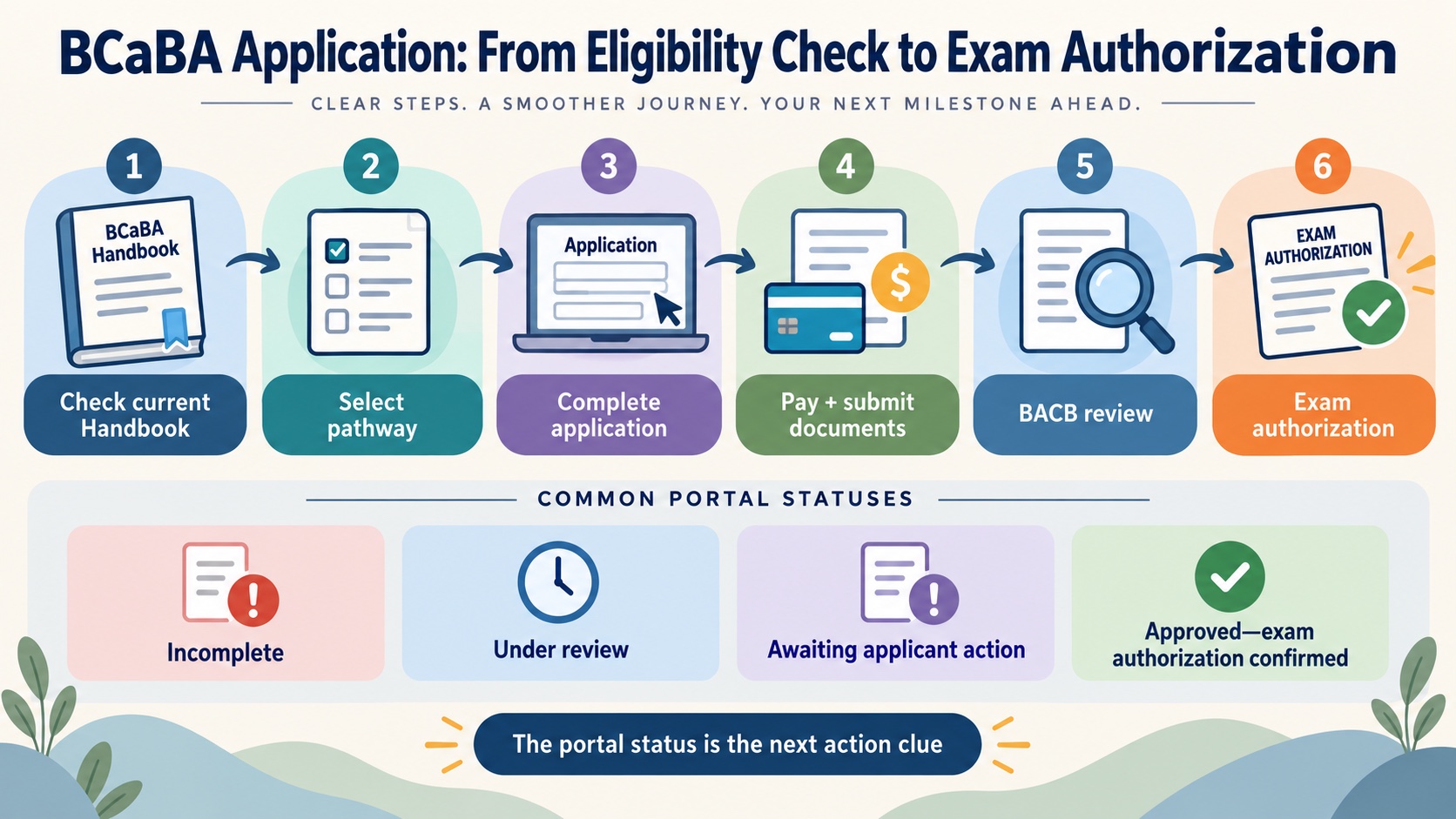
If you are searching for a BCaBA application, you may be asking two questions at once: how do I submit the application, and what happens after I click submit? The answer is a sequence of eligibility confirmation, pathway selection, payment, document submission, review, and examination authorization.
This guide explains the application workflow and the status labels that can appear in the BACB portal. It is a navigation guide, not a personal eligibility determination. Requirements and document versions can change, so use the current BCaBA Handbook, live BACB pages, and 2027 transition materials when you make your own decision.
Quick answer: what the BCaBA application does
The BCaBA application is the formal submission through your BACB account after you have addressed the applicable eligibility requirements. The current BCaBA Handbook describes a sequence that includes meeting requirements, completing the application in the account, paying the fee, submitting documents, receiving an application determination, and passing the BCaBA examination.
The application is not the place to guess which pathway or document version applies. It asks for specific degree and coursework information, requires attestations, and may require additional documentation if you report certain history or request an accommodation. If a field is unclear, review the Handbook and contact the BACB through its official process rather than relying on a forum answer.
Before you open the application
Confirm the pathway you are using. The BCaBA Handbook describes eligibility pathways, including a pathway based on an ABAI-accredited program and a pathway based on behavior-analytic coursework. The application asks you to select the pathway. If you choose the wrong one, the Handbook warns that you may need to submit and pay for a new application.
Gather official records. Your degree, coursework, fieldwork, attestations, and other required documents need to be available in the form the current Handbook describes. A transcript sent by a university or third-party service is not the same as a document you merely uploaded or requested. Track what was sent, by whom, and when.
Match names and identity details. Your BACB account, application, transcript, and other documents should use information that matches your current official identification. If your name changed, follow the BACB name-change instructions before the mismatch becomes a testing-center or review problem.
Check payment and timing. An application can remain incomplete or await payment even after some fields are filled. Processing timelines change, so use the live BACB Application Processing Updates page rather than a screenshot or an old blog post.
Separate application questions from eligibility questions. A study article can help you understand the route, but it cannot decide whether a specific degree, coursework pattern, fieldwork record, criminal history, or health disclosure meets the rules. The BACB directs applicants to the relevant Handbook and official contact process for those questions.
The application sequence
The exact portal labels can change, but the practical sequence is easier to manage when you treat it as a checklist:
- Review the current Handbook. Confirm the current eligibility pathway, forms, document instructions, exam information, and application-processing agreement.
- Complete the application in your BACB account. Select the pathway and enter degree/coursework information carefully. Use your legal and official details consistently.
- Complete attestations and disclosures. Read the Eligibility Affidavit and related questions carefully. A “yes” answer to a disclosure question may require an additional form or review; it is not a reason to guess or omit information.
- Pay the required fee. Keep the payment record and check whether the portal shows payment as received.
- Submit the required documents. Make sure transcripts and other documents are sent through the accepted route. Keep copies and confirmation messages for your records.
- Monitor the portal and email. Review the Action Items widget and respond to requests for missing or corrected documentation.
- Wait for the application determination. If approved for examination, follow the current instructions for authorization and scheduling. Application approval is not the same as passing the exam.
What common portal statuses mean
The BACB’s application-lifecycle guidance describes several statuses. The wording shown in your portal is the authoritative status for your record, but these plain-language meanings can help you know what to investigate:
| Status pattern | What it generally indicates | Useful next action |
|---|---|---|
| Incomplete | The application has not been completed and submitted for review. | Open the application, complete required fields, and submit it. |
| Awaiting payment and documents | The application is submitted but payment and/or required records are not yet received. | Check the invoice, transcript route, and document confirmations. |
| Under review | The application is considered complete enough for BACB staff review. | Monitor email and the portal for requests. |
| Awaiting applicant action | Additional information or documents are required. | Open the Action Items widget and respond carefully. |
| Approved—exam authorization confirmed | The application has been approved and examination authorization is confirmed. | Follow the current scheduling instructions. |
| Expired | The application was created more than the allowed active period ago and is no longer active. | Review the live BACB instructions before creating a new application. |
A status is not a diagnosis of your whole certification journey. For example, “under review” does not mean the examination is passed, and “awaiting applicant action” does not tell you which personal document will be accepted without reading the specific request.
Build a document trail
Create one private checklist before you submit. List each document, the person or institution responsible for sending it, the accepted submission route, the date it was sent, the date it was confirmed, and the portal status that should change next. Keep the checklist separate from the application itself so you can see missing items without repeatedly editing a submitted form.
This is especially helpful when a university sends a transcript or an attestor submits coursework information on your behalf. A message saying “sent” may only confirm that the sender completed their part. The BACB lifecycle guidance distinguishes sending from receipt and explains that documents may be retrieved and attached to the applicant record later. Save confirmation emails, but use the portal record and official BACB response as the operational evidence.
If the BACB asks for an action item, answer the exact request rather than uploading a large unrelated folder. Read the requested document version, name files clearly, and check that the replacement addresses the reason the item was opened. After resubmitting, record the date and continue monitoring the portal. If the request is unclear, use the official contact route and include the application context the BACB asks for. This keeps a correction traceable instead of creating a second uncertainty.
The 2026-to-2027 boundary
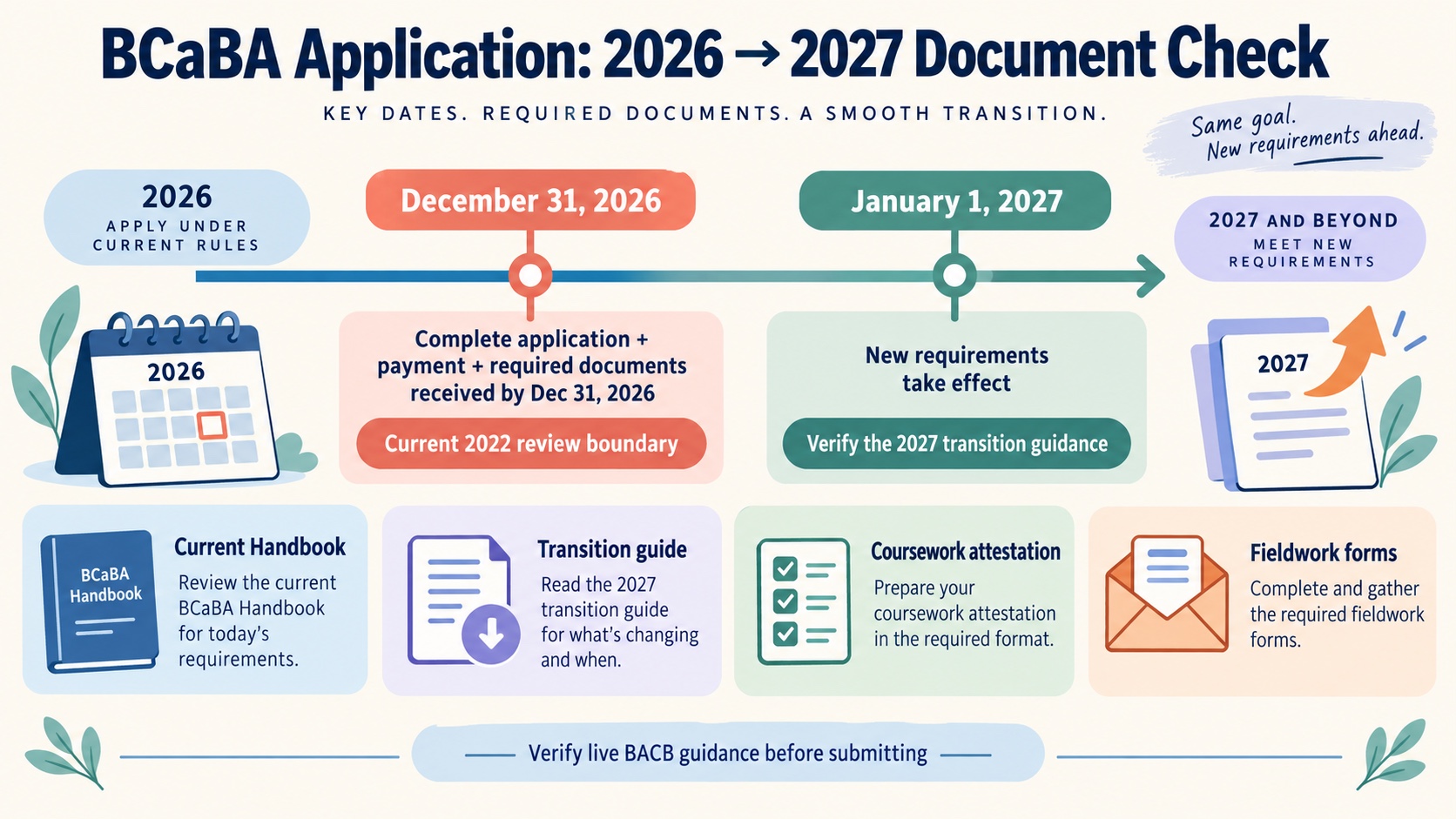
BCaBA applications are especially date-sensitive right now. BACB transition guidance states that significant BCBA and BCaBA requirement changes take effect January 1, 2027. BACB also states that a complete application—including payment and required documents—received by December 31, 2026 can be reviewed under the current 2022 requirements. That is a timing rule, not a promise that an applicant qualifies or that a submission will be approved.
Before submitting near the transition, check four things on the live BACB pages:
- Which requirement set applies to your intended application date and document-completion status?
- Which coursework attestation, fieldwork form, and Handbook version does the current guidance require?
- Has your university or supervisor submitted documents through the current route?
- Does your plan allow time for payment, transcript receipt, review, action items, and any requested correction?
Do not use an old checklist that says “VCS” or lists a form version without checking the current BACB transition page. A page can be historically accurate and still be the wrong operational guide for a 2026 or 2027 application.
The safest habit is to treat every deadline, form, and document route as a live link. Save the source you checked, note the date, and revisit it immediately before submission. That habit is more reliable than copying a requirement from a study note that was written for a previous application cycle.
Common application mistakes
Applicants often focus on the final click and under-plan the document trail. Common problems include selecting a pathway before confirming it with the program, entering a name that does not match official records, assuming that “sent” means “received,” overlooking a portal Action Item, and using a saved form from a previous requirement period.
Another mistake is treating a general BCaBA article as a substitute for a current application decision. Use accepted resources on BCaBA requirements, fieldwork hours, and the examination to learn the vocabulary, then return to the official Handbook for the actual submission.
FAQ
Where do I submit a BCaBA application?
The current BCaBA Handbook directs applicants to complete the certification application in their BACB account under the certification application area after meeting the applicable eligibility requirements.
How long does a BCaBA application take?
Processing timelines can change. Use the live BACB Application Processing Updates page for current information. The Handbook and lifecycle guidance explain what happens when documents are missing or additional action is requested.
Can I apply if I am unsure which BCaBA pathway fits?
Do not guess. Review the current BCaBA Handbook and discuss the pathway with your training program or mentor. The BACB does not make a personal eligibility determination through a general article.
What is the 2027 BCaBA application deadline?
The transition guidance says a complete application with payment and required documents received by December 31, 2026 can be reviewed under current 2022 requirements, while 2027 requirements take effect January 1, 2027. Read the live transition guide for the details that apply to your situation.