
BACB Fieldwork Tracker: Excel and PDF Options That Keep Records Clear
People searching for a BACB fieldwork tracker Excel download PDF are usually trying to solve two problems at once: they need the right official forms, and they need a workable way to record hours before a monthly verification form is due. The important distinction is that a personal Excel or spreadsheet tracker is an organizer. It is not a BACB verification form, a supervision contract, or an approval that an activity counts.
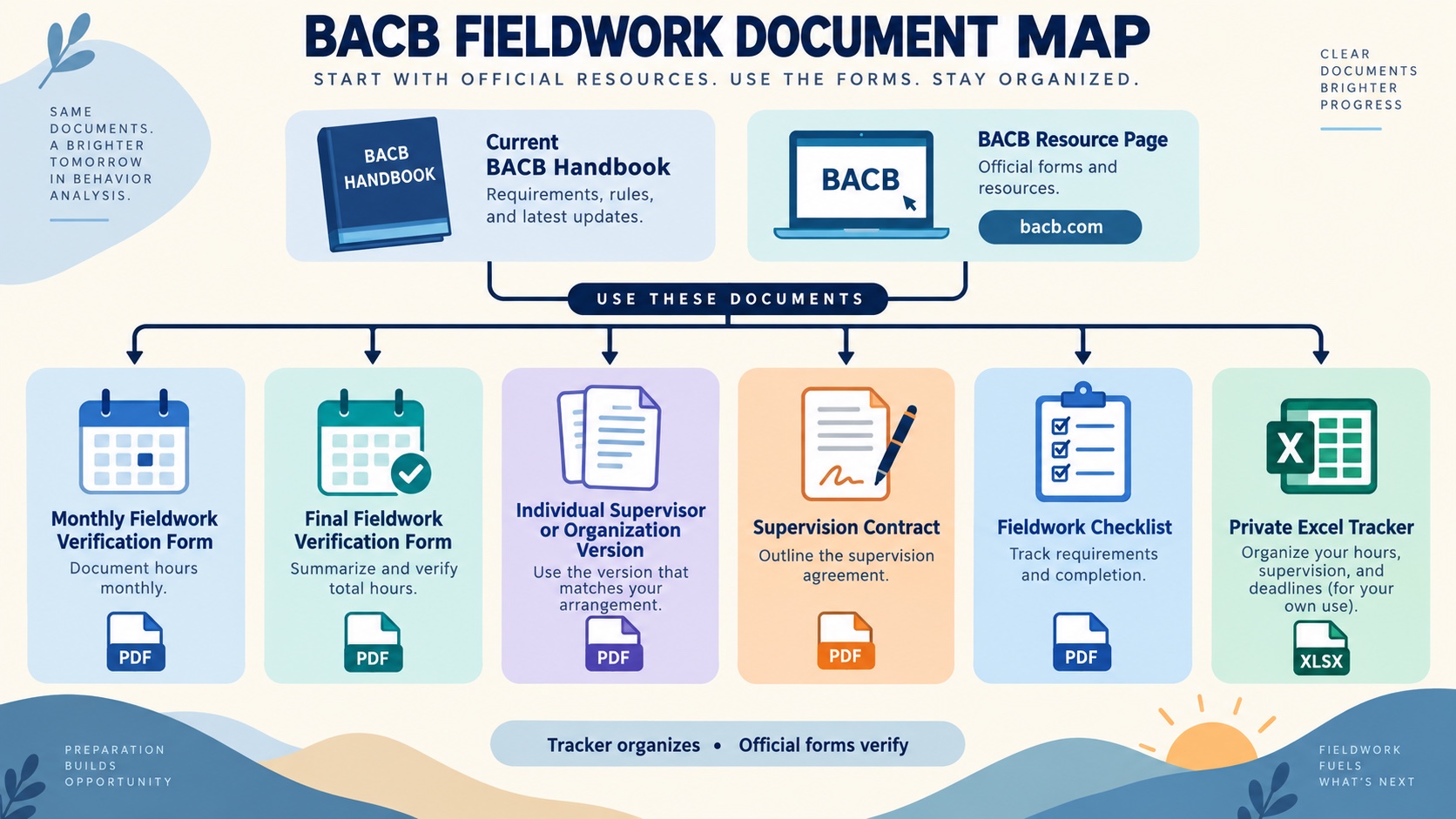
Start with the BACB fieldwork resource page for the current Monthly Fieldwork Verification Form, Final Fieldwork Verification Form, Fieldwork Checklist and Tip Sheet, supervision-contract resources, and any 2027 versions that apply to your timing. Then build a private tracker that mirrors the evidence your supervisor needs to review. This guide shows what to download, what to record, and where a spreadsheet must stop.
Table of Contents
Short answer: which file should you use?
Use the current BACB resource page to download the form version that matches your fieldwork arrangement and governing requirements. An individual-supervisor form and an organization or multiple-supervisors form are not interchangeable just because both ask for hours. The Monthly Fieldwork Verification Form records a supervisory period. The Final Fieldwork Verification Form summarizes a completed fieldwork experience for the application record.
Use Excel, Google Sheets, or another private record system to capture information as it happens. A good tracker helps you and your supervisor notice missing observations, unclear activity classifications, an incorrect fieldwork type, or a month that has not been signed. It should make the official form easier to complete, not become a substitute for it.
The official BACB PDFs to locate
The BACB fieldwork pages are the best starting point because they group documents by credential and topic. Look for these resources:
- Monthly Fieldwork Verification Form: the recurring record for a supervisory period. The official instructions identify the relevant fieldwork type, hours, supervision percentage, attestations, signatures, and timing.
- Final Fieldwork Verification Form: the final record for a completed fieldwork experience. It is not simply a monthly form with a larger total.
- Individual supervisor versus organization form: select the version that matches one supervisor or multiple supervisors at one organization. If the structure changes, ask the responsible supervisor which form and documentation process apply.
- Fieldwork Checklist and Tip Sheet: use it before starting and when reviewing whether your contract, supervisor, documentation system, and fieldwork records are in place.
- Supervision contract and handbook: the contract and the current BCBA or BCaBA Handbook establish the relationship and requirements that a spreadsheet cannot invent.
For the 2022 fieldwork materials, the BACB’s individual Monthly Fieldwork Verification Form says it should be completed one form per supervisor and per fieldwork type, signed by the last day of the following calendar month, retained by both parties for at least seven years, and not submitted unless requested. Read the current form itself before relying on those details, because forms and requirements can be revised.
What to put in an Excel-style tracker
A tracker works best when it captures one level of information per row. You can use one sheet for daily activities and a second monthly summary sheet, or use one sheet with clear filters. Keep the following fields visible:
- Identity and dates: trainee name or private ID, fieldwork type, month, start date, end date, setting, and supervisor relationship.
- Activity details: date, activity description, client connection, restricted or unrestricted classification, and whether the supervisor was present.
- Hours: independent hours, supervised hours, total hours, and the supervision percentage calculated from the appropriate current rule.
- Supervision evidence: individual or group contact, observation with a client, feedback received, and the location of the note or record.
- Document trail: contract filename, monthly form filename, signature status, correction history, and the source version used for the month.
- Review status: ready for supervisor review, correction needed, signed and retained, or pending a requirements decision.
Do not put identifiable client information into a shared template or public download. Use a private identifier and store detailed clinical records in the approved system for your setting. A public-facing article can explain the fields without collecting a learner’s BACB ID, client name, address, or account credentials.
Use formulas only for transparent arithmetic. A total-hours formula can add entries, and a supervision-percentage formula can divide supervised hours by total hours when total hours are greater than zero. Do not create formulas that silently relabel an activity, apply a 1.33 multiplier to every row, or decide that an hour is unrestricted. Classification and compliance require the current requirements and supervisor review.
A monthly closeout workflow
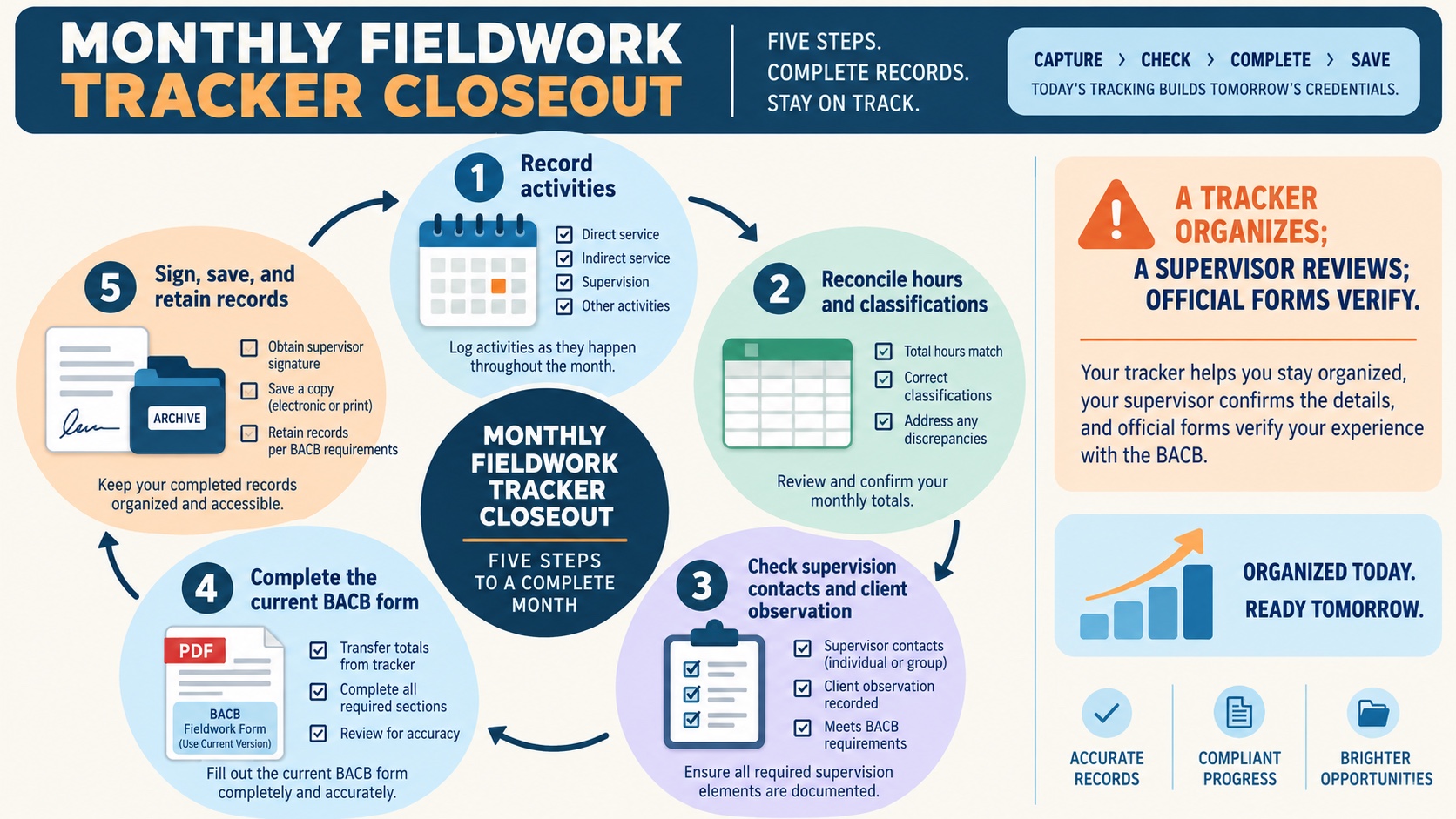
Close each supervisory period while the records are still easy to reconstruct:
- Freeze the month. Stop adding new activity to the month’s working view and confirm the date range and fieldwork type.
- Reconcile activities. Compare the tracker with calendars, service records, supervision notes, and the activity descriptions. Remove duplicates and mark uncertain classifications instead of guessing.
- Check the required evidence. Review hours, supervision contacts, individual or group components, client observation, unrestricted activity, and any current rule that applies to the fieldwork type.
- Prepare the official form. Transfer verified totals to the correct current BACB form. A tracker total should never be copied without the supervisor reviewing the underlying entries.
- Sign, save, and reconcile. Save the signed form with a stable filename, preserve correction history, and keep the trainee and supervisor copies according to the current instructions.
A useful filename can include the credential, fieldwork type, month, supervisor structure, and version label—for example, a private name such as BCBA-SF-2026-09-individual-MFVF. Do not include client names in filenames. Keep the tracker, signed form, contract, and correction notes linked without turning the tracker into a replacement form.
How to handle the 2027 boundary
Fieldwork documents are date-sensitive. The BACB resource pages now surface 2027 BCBA and BCaBA requirements and 2027 monthly and final form versions. Do not rename a current spreadsheet “2027” just because you plan to apply next year. Put the application date, governing pathway, fieldwork type, and form version at the top of your tracker, then compare them with the official transition guidance.
The 2027 requirement changes are separate from the BCBA examination content outline. A tracker should not call the change a new “7th edition” exam, and it should not mix current and 2027 supervision percentages in one unlabeled column. If your fieldwork crosses the transition, ask the qualified supervisor or program contact which requirements and forms govern the record before changing formulas.
What a tracker cannot decide
- Whether a specific activity qualifies as behavior-analytic fieldwork.
- Whether the supervisor is qualified or whether the supervision relationship meets the current rules.
- Whether the fieldwork type, supervision percentage, observation, or activity classification is correct for your application.
- Whether a form is complete enough for an application or audit.
- Whether a jurisdiction, employer, funder, or licensure rule adds a requirement.
The BACB’s fieldwork documentation guidance recommends that both trainee and supervisor track the hours and that the supervisor review the hours for each supervisory period before signing the Monthly Fieldwork Verification Form. That is the right boundary: technology can make the evidence easier to see, but it cannot approve the evidence.
Common mistakes and FAQ
Is there one official BACB Excel tracker?
Do not assume that a spreadsheet found online is an official BACB record. Start from the current BACB fieldwork resource page and use the official PDFs and checklist there. A private Excel-style tracker can be useful, but label it as a planning aid.
Can my tracker replace the Monthly Fieldwork Verification Form?
No. Use the current official form and follow its instructions, signatures, timing, and retention rules. Your tracker should help you prepare and review the form.
Should I track BCBA and BCaBA fieldwork in the same sheet?
You can use one workbook only if the credential, pathway, fieldwork type, supervisor, and governing version remain unmistakably separate. Separate tabs are usually safer than one combined total that hides different rules.
Where can I get the PDF forms?
Use the current BACB BCBA fieldwork resources or BACB BCaBA fieldwork resources. Those pages are more reliable than a random old download because they surface current resource versions and transition materials.
For related learning, use the BCBA learning path, the BCaBA learning path, and the ABA glossary. They can clarify terminology and support study, but they do not replace the BACB Handbook, official forms, a supervision contract, or a qualified supervisor’s review.